
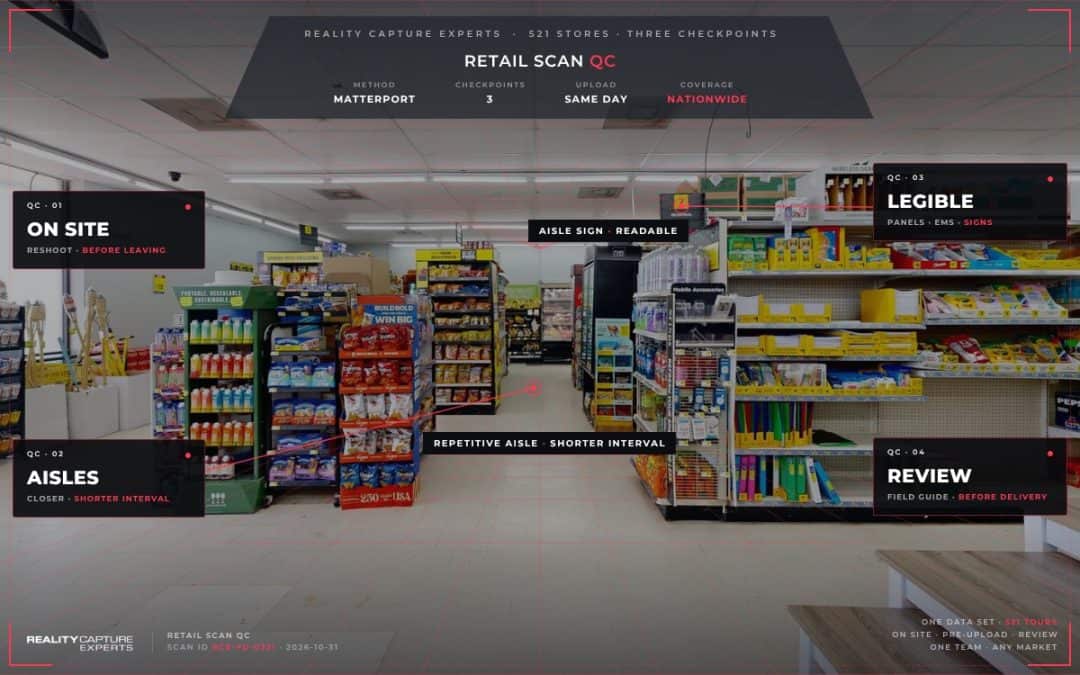
RCE ran retail scan QC on 521 store scans at three checkpoints: the technician’s check in the store, the pre-upload markup, and RCE’s review against the field guide before delivery. Lessons from those checks went back to every technician while the program was running, so quality rose as the program went on.
Our post on keeping scan quality consistent across multiple facility sites covers the general method. This post covers what retail scan QC looked like in practice, including what discount store aisles do to a scan. It is part of our write-up on how RCE documented 521 retail stores after remodel.
Key Takeaways
- Long, identical discount store aisles are the most common cause of misaligned scans, so technicians shortened their interval there as routine.
- Every panel, sign, and safety system was checked for legibility before the technician left the store.
- RCE reviewed each store model against the field guide before delivery.
- Field lessons, such as printed authorization letters and door stops, went to every technician during the program.
What Did Technicians Check Before Leaving a Store?
Retail scan QC started in the store. Before leaving, the technician reviewed the Matterport Pro3 capture in the Matterport Capture app and confirmed:
- Every room in the store and every required exterior side was captured
- Electrical panels, the Energy Management System, alarm panels, and the road sign were readable
- No scan position was misaligned
Any position where a label, sign, or panel schedule was not readable was reshot on the spot. At a store, a reshoot takes minutes. A return trip to a store hours away takes a day.
Why Do Discount Store Aisles Cause Misaligned Scans?
A discount store sales floor is rows of nearly identical shelving, and back rooms are long and repetitive. From one scan position to the next, the scanner sees very few unique features to match, so positions can misalign.
When a position showed as misaligned, the technician deleted it, moved closer to the last correctly aligned position, and rescanned at a shorter interval. On the 521-store program, technicians shortened their interval in aisles and back rooms as routine rather than waiting for a misalignment.
What Happened to Each Store Model Before Upload?
Before upload, technicians marked every mirror and window, pointing toward the room, and applied trim markers along the outermost exterior positions. Each model was named by retailer, store number, city, and state, with the store address entered, and uploaded the same day as the shoot.
With 521 models arriving, that naming convention is what let reviewers and the client match every tour to the right store without guesswork. Same day upload meant a gap found in review could often be fixed while the technician was still in the region.
What Did Retail Scan QC Review in Each Store Model?
After upload, RCE reviewed each model against the program field guide before delivery:
| Check | What the reviewer confirmed |
|---|---|
| Room coverage | Sales floor, back of house, restrooms, offices, and utility rooms are all in the tour |
| Exterior coverage | Perimeter matches the building type: standalone, inline, or end cap |
| Road sign | The branded pylon or monument sign is clear from surrounding positions |
| Legibility | Electrical panels, Energy Management System, and alarm panels are readable |
| Naming | Model name and address match the store number |
Retail scan QC at this stage was a full check against the field guide. RCE runs dedicated AEC specialist QC on every program, with post production client notes on every scan.
How Did Retail Scan QC Lessons Reach Technicians?
Retail scan QC findings went back into the field while the program ran. RCE shared short video walkthroughs and posts with the technician community and updated the field guide as lessons came in. Lessons from the 521-store program included:
- Carry a printed Letter of Authorization, because a phone screen did not work well with store managers
- Prop doors open with door stops rather than standing in the doorway
- Dress for a job site and wear the high visibility vest
One near complete store tour by an RCE member was shared as the reference example for everyone on the program. Feedback was framed to educate rather than embarrass, and the vast majority of scans met the standard.
How RCE Runs Retail Scan QC
RCE builds retail scan QC into every stage of a retail program, from the field guide to the review before delivery. That is how a construction team can trust 521 store tours as one data set. Read the full program story in how RCE documented 521 retail stores after remodel.
Frequently Asked Questions
Who reviewed the store models before delivery?
RCE reviewed each model against the program field guide before delivery, with dedicated AEC specialist QC on every program.
Why did some store scans misalign?
Long, identical aisles and back rooms give the scanner few unique features to match. Rescanning closer to the last aligned position at a shorter interval resolved it.
How were store models named?
Retailer, store number, city, and state, with the store address entered, so every model matches one store.
How did lessons reach technicians during the program?
Through short videos, technician community posts, and field guide updates sent to everyone at once.